


What Does UB Stand for in Medical Billing?
We have observed one recurring situation, which slows cash flow more than any other thing, and that is the confusion of institutional billing requirements.
For a lot of providers who are moving out of a private practice model into a facility-based model, or a new administrator, the UB medical abbreviation could be another alphabet soup. Nevertheless, knowing the ins and outs of the Uniform Billing (UB) system is the distinction between clean claims rates and a growing stack of “Return to Provider” (RTP) notifications.
The guide is aimed at the US doctors, practice managers, and hospital administrators who require a clear professional breakdown of the UB-04 form. We are going to examine the UB full form in medical billing, break down the key elements of the form, and give an in-depth analysis of revenue codes and denial prevention methods. So let’s start.
What is UB in Medical Terms?
To interpret the UB medical abbreviation, we should refer to the history of the standardization of healthcare. The UB abbreviation used in medical bills is known as Uniform Billing. Prior to the 1970s, the hospitals and facilities had to deal with a disorganized environment of hundreds of different billing forms, each demanded by a specific insurance company.
The National Uniform Billing Committee (NUBC) was created in 1975 in order to create one uniform billing document. This resulted in the establishment of the UB-82, then the UB-92, and finally the current standard, the UB-04.
When we refer to UB in medical billing terminology, we are actually referring to the institutional claim form that is utilized by hospitals, nursing homes, and the like. An independent physician would normally utilize the CMS-1500 (professional claim), but any provider submitting facility-based claims, including emergency room visits, inpatient stays, or outpatient surgery, would have to master the UB-04.
Key Components of the UB-04 Form
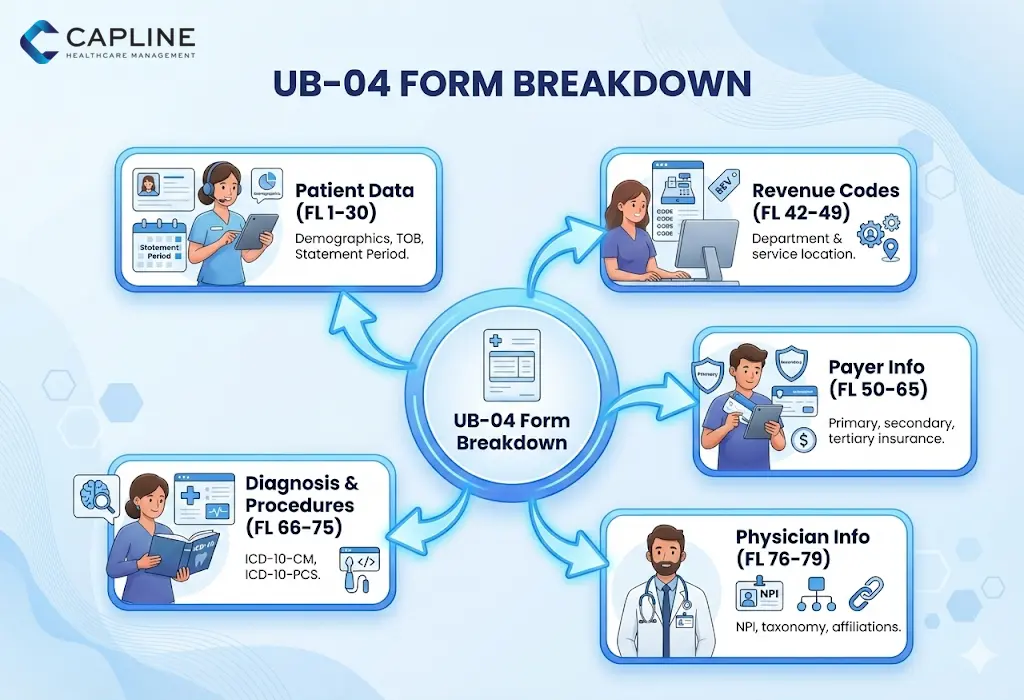
Though a UB-04 form has 81 separate fields, which are called Form Locators (FL), they are typically organized into five different categories. This knowledge of these buckets would allow your billing team to know where the mistakes are most likely to happen.
- Patient Data (FL 1-30): This will contain the basic demographics, the type of bill (TOB), and the patient’s “Statement Covers Period.”
- Revenue Codes & Description (FL 42-49): This is the most important part because it denotes where or what the service was within the facility.
- Payer Information (FL 50-65): The information about the primary, secondary, and tertiary insurance carriers.
- Physician Information (FL 76-79): This is used to identify the attending, operating, and other physicians through NPI and taxonomy codes.
- Diagnosis & Procedure Codes (FL 66-75): The use of ICD-10-CM and ICD-10-PCS code sets to support a medical necessity.
Proven Methods to Prevent Rejections (Avoid Denials)
The most annoying thing about revenue cycle management (RCM) is seeing a valid 50,000 dollar claim being denied due to a mere clerical mistake. The medical industry would save almost $20 billion every year by automating and optimizing claim submissions, according to the 2024 CAQH Index.
1. Check the Type of Bill (TOB) Code
TOB is a four-digit code (usually beginning with a leading zero) that is present in FL 04. It provides the payer with information about what kind of facility is billing and what the frequency of the claim is. One of the mistakes is “131” (Hospital Outpatient Admit through Discharge) instead of “137” (Replacement of Prior Claim).
2. Audit Your NPI and Taxonomy Alignment
A discrepancy between the NPI on the claim and the NPI on file with the credentialing department in the payer is one of the most significant reasons why the UB medical abbreviation results in a denial. Make sure that the “Attending Physician” in FL 76 is a qualified individual and is appropriately affiliated with your facility in the PECOS system (when it comes to Medicare).
3. Implement “Front-End” Scrubbing
Don’t wait until the clearinghouse informs you that a claim is wrong. A pre-submission scrub in your RCM workflow should look at:
- Incomplete patient identifiers.
- Invalid Revenue Code/HCPCS combinations.
- Missing “Admit Date” for inpatient claims.
- Incorrect “Value Codes” (FL 39–41).
4. Monitor the “Condition Codes”
FL 18–28 allows you to explain special circumstances, such as whether the service was related to an accident or if it was a “non-covered” service the patient requested. Failure to include these codes often results in a “Request for Information,” which can delay payment by 30 to 60 days.
5. Transition to Electronic 837I
If your practice is still mailing paper UB-04 forms, you are at a significantly higher risk for data entry errors at the payer’s end. Electronic submission allows for real-time validation.
What Revenue Codes are Required on Every UB-04 Claim?
The HCPCS/CPT code is what you did, and the Revenue Code includes where you did it. Revenue codes consist of a four-digit number, and it indicates the department that is involved in the hospital and which offered the service to the insurer. A UB-04 cannot do without them.
These codes are found in the Uniform Billing in Form Locator 42. The most common categories of the revenue code we observe in successful institutional billing are as follows:
| Revenue Code Range | Category Description | Common Use Case |
| 011X – 016X | Room & Board | Inpatient stays, private vs. semi-private rooms. |
| 025X | Pharmacy | General drugs and biologicals. |
| 030X | Laboratory | Routine and diagnostic clinical lab tests. |
| 045X | Emergency Room | All services are provided in the ER. |
| 051X | Clinic | General clinic visits (e.g., Rural Health Clinics). |
Why Revenue Codes Matter for Reimbursement
Payers tend to have certain “carve-outs” or reimbursement rates tied to these codes. For example, some payers may pay a flat rate for any service under code 0450 (ER), while others require a specific HCPCS code to be paired with it in FL 44.
Conclusion
The UB medical abbreviation and the complexities of the UB-04 form are important to know these days. By focusing on accurate revenue codes, validating your “Type of Bill,” and moving toward electronic 837I submissions, you can significantly reduce denials
If your facility is struggling with claim rejections or outdated billing workflows, we can help. Contact Capline today!
People Also Ask About UB in Medical Billing
1. What is the difference between CMS and UB?
CMS-1500 refers to the individual physician, and the therapeutic outpatient claims form is referred to as the professional claim form. Conversely, UB-04 (or UB) is the institutional type that is used by facilities, such as hospitals and SNFs, to bill for the utilization of a piece of equipment, space, and personnel.
2. What other info is on a UB-04 form besides patient data?
Other than the demographics of the patients, the UB-04 contains essential information such as revenue codes, value codes (FL 39-41), and condition codes (FL 18-28).
3. What diagnosis and procedure codes are used on UB-04 forms?
ICD-10-CM is mostly used in UB-04 forms as a diagnosis code, and ICD-10-PCS as an inpatient procedure. Whereas the outpatient facility code is done using the CPT and HCPS, the ICD-10-PCS is specific to the institutional level.
4. When must providers use electronic 837I instead of paper UB-04?
The majority of providers are obligated by the Administrative Simplification Compliance Act (ASCA) to electronically file claims with Medicare (837I). UB-04 forms (papers) are only accepted in the case of small providers (less than 25 full-time employees) or waiver situations.
5. What medicare specific requirements apply to UB-04 claims?
Medicare requires the use of certain types of bill codes and the use of the MBI (Medicare Beneficiary Identifier) of the patient.
6. How do late charges get reported on corrected UB-04 forms?
Missed late charges on the original claim are to be reported with a special type of bill code that ends with a 5 (e.g., 0135).